The New Ubuntu 11.10 ‘Oneiric Ocelot

8:39 PM

(3) Comments

Good news for Linux fans in particular the users of Ubuntu, has been waiting for has finally been released. The final release of Ubuntu codenamed Oneiric OCELOT 11:10 on October 13, 2011, Oneiric OCELOT is the 15th release of Ubuntu, and would be supported for 18 months for both desktop and server versions.
Ubuntu founder, Mark Shuttleworth chose the codename for Ubuntu 11:10 Oneiric OCELOT this. This name, according to Mark, described the cycle of 11:10 version emphasizes on two things, namely dreams and disiplin.Selain that, when interpreted word for word, "Oneiric", in Greek, meaning dream and "OCELOT" is a kind of wild cats that live in Central and South America.

Ubuntu does have a unique gift distronya name using the name of the animal. Similar to Android that each version uses the name of the dessert for breakfast.
11:10 Ubuntu is available for download from the mirror servers around the world, including all versions of the Ubuntu family (Ubuntu Destkop, Ubuntu Server, Ubuntuk Cloud, Kubuntu, Xubuntu, Lubuntu, Edubuntu, Mythbuntu and Ubuntu Studio).
Here are the main features and enhancements in Ubuntu 11:10

Key Features:

  • Unity 3D interface 4.22;
  • Unity 2D interface 4.12;
  • GNOME 3.2.0;
  • Linux kernel 3.0.4;
  • X.Org 7.6;
  • Xorg Server 1.10.4;
  • Upstart 1.3;
  • GCC 4.6 toolchain;
  • Phyton 2.7.2;
  • Compiz Fusion 0.9.6;
Additional Features:

  •     Increased beauty destkop; powered by Unity peluncurnya panel and which have now been ported to GTK3.
  •     Two methods of login; you can choose to use 3D or 2D interface.
  •     The new login screen; 11:10 Ubuntu is now using LighDM, a login manager that is lightweight and beautiful.
  •     Function key combination Alt + Tab new.
  •     Fourteen new wallpaper.
  •     The new Ubuntu Software Center; has been redesigned with a more professional interface.
  •     Mozilla Firefox 7; The latest version of Mozilla's popular web browsers.
  •     Mozilla Thunderbird 7; Manager emails from Mozilla that has now become the default email client for Ubuntu 11.10.     Deja DUP; new backup device.
  •     Support Multiarch; better compatibility for 32-bit architectures to 64-bit systems.
  •     Supports the ARM architecture; Just for Server version.
  •     Support multiple languages ​​for the script; Japanese, Chinese and Korean.
  •     Hybrid CD / USB ISO Images; possible to copy the ISO Images directly on a USB disk.
  •     Music new lens; associated with the Banshee application that facilitates the search for music locally and online


Read more >>

hide the page owners on facebook

11:07 PM

(8) Comments

Not something that is difficult indeed, but enough to make us confused if we did not try to learn it, as well as in making a page on facebook, a lot of things that we want to keep private, ranging from the owner, origin and much more, well, but because the many requests from friends of the owner fan page, now I make a tutorial how to hide the page owners on facebook, this way is very easy.
 
just follow the page owner's  friend this step

- login facebook 
- then click on the page your own fans page
- after that click on Edit info


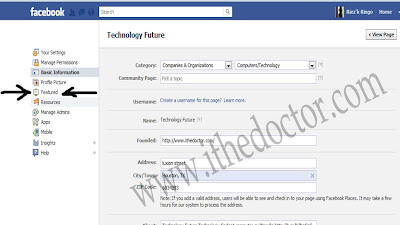
 -then on the left select the Featured tab (number five on the left)
 -then there are the bottom-page owners and click Edit  Featured Page owners
 -Remove the checklist and the final step of existing and then select Save
 -then reopen your facebook page, the owner of fans page you are successful in hiding
if this info helpful please share and Please Like my Fans page
Read more >>

avatha

,

Create a Timeline on Facebook

1:59 AM

(4) Comments

Tutorial below may not be used again, because the update of facebook developers themselves, please click the following link to make your facebook timeline


some
time ago the social networking Facebook has announced its new application on facebook at present with the latest modifications and certainly refreshing eye, this application must already exist and in Indonesia have not been thorough, but we can soon get the latest designs from this facebiik without waiting for long , well just go ahead

Please go to the page Facebook Developer app
Click "+ Create New App"


Give the name of the "application display name : ithedoctor.com" and "namespace : ithedocto", wrote it up, then "put checks on the privacy policy" click "continue"
Enter the "Security Check" Do not forget to click "submit"

 Point your mouse pointer to the left of the page developer app,
 select it and click "Open Graph" and enter any word in the two boxes provided (look like the example in figure), Do not forget to click "Get Started"

all friends will be automatically terredirect to the settings page, if not, just right click "settings" (the above Open Graph)
Jump just scroll down and click "Save changes"
Wait until a few minutes, open the back porch facebook friends, notice will appear "Introduction Timeline .." Click the "Get it Now"
There are five steps to the Tour when friends are in the timeline facebook page, if already completed setting up the necessary configuration, just click "Publish Now"

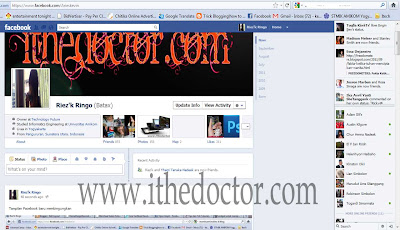
well the result will be as an example my own facebook page
  
Read more >>