Showing posts with label Tips and tricks. Show all posts

GoToMyPC Remote Desktop App Access the Computer via iOS

7:37 PM

(2) Comments


GoToMyPC is an application that allows users to access the computer via an iOS device from anywhere. Access is not only just to see the files stored on the computer but all the functions like user actually being in front of a computer monitor, such as running the file, program, and even connect to a network owned computers.

This app connects iPad and iPod Touch through WiFi or 3G and 4G cellular networks. Meaning users can actually access to connected computers from anywhere. This application also has a feature that can lock the keyboard on and off screen monitor being accessed to avoid double control.
GoToMyPC Remote Desktop App Access the Computer via iOS

Developer  : Citrix
Device  : iPhone 3GS, iPhone 4, iPhone 4S, iPhone 5, iPod Touch, (3rd Generation), iPod Touch (4th Generation), iPod Touch (5th Generation) and iPad.
Minimum Requirements  : iOS 4.2 or Later.
Download  : AppStore
Price  : Free
File Size  : 10.5 MB

Read more >>

Air Display Apps Make iPad as Second Screen From Monitor computer

1:04 AM

(1) Comments

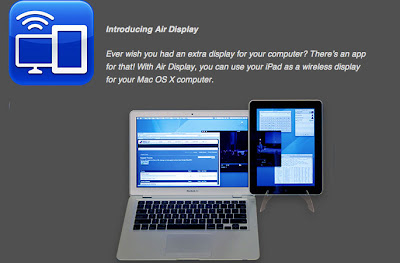
Air Display iPad screen seems quite wide enough fun when used as a second monitor to your computer. To do so, you can add to the list of Air Display app on the iPad. as well as a second monitor, you can enable the iPad to display images exactly as they appear on the primary monitor (mirror), or make it as an additional area to expand what is shown the main monitor (extended). Difference, you do not need a cable to connect the iPad to a computer.

Not only as a secondary monitor, the application also allows the iPad to be used as the equivalent controller as a keyboard or mouse. This application can be used to connect to a computer running windows or Mac.
Air Display Apps Make iPad as Second Screen From Monitor computer

Read more >>

Tricks Tutorial: Skill And Dribbling For FIFA 13

4:52 AM

(1) Comments

This time I want to share some of the tricks and skills that are available in FIFA13. As you know, EA Sports enters some lovely gesture berskill high in the game, so that makes us gamers felt the original player is controlling.
Tricks Tutorial: Skill And Dribbling For FIFA 13

Fascinating tricks and skills that included Electronic Arts is copied directly from the original players, so there are some skills that can only be performed by the player.

I simply share the tricks to play FIFA13 on PS3

     Flair Pass = Hold R1 + X and press LS ↑

     Complete Dribbling = Hold L1 and LS run in any direction

     Fake Fance Shoot = Hold L2 + □ or O and press X

     Roll Ball Flick = Hold R2 then RS ↑ and →

     Fake Shot To Stop = Press □ or O then X

     Fake Shot Pass = Hold R1 then LS ↖ and X

     Face Up Dribbling = Hold L2 + R2 then LS in any direction

     Reverse in Air Elastico = Hold R2 then RS ← →

     Backheel Shot = Hold R2 + LS ↓ then O

So a few tricks that I can share to you FIFA13 fans, you can combine these movements in order to create great goals. Have Fun for All

For those of you who want to see how the movement of the tricks is running on the PS3, can watch in this video


For those of you who play FIFA13 on Xbox 360 can see in this video

via gameranx
Read more >>

Sending Files in Blackberry via NFC

8:37 PM

(1) Comments


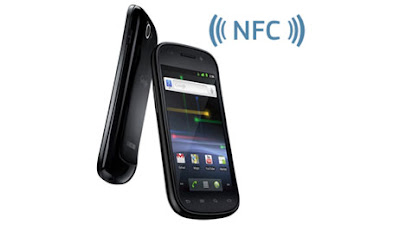
One year already feature NFC ( Near Field Communication) circulating in the universe blackberry, especially in an already using Blackberry OS 7.1. However, this application may be familiar to many users yet blackberry.
Here are tips from Research In Motion (RIM) about sending files via NFC with Near Field Communication you can transfer files and images between the Blackberry is also equipped with NFC tags with a Blackberry
Near Field Communication

Current blackberry OS 7.1 has been circulating on the series of the Blackberry Bold 9900 (Dakota), Bold 9930, Bold 9790 (Bellagio), Curve 9360 (Apollo), Curve 9380 (Orlando), and Blackberry Porche.

Well, here are the steps its use

1. Enabling NFC (Near Field Communication)

first enable NFC in Connection. Check the option "Near Field Communication" to enable the NFC. If this feature is not used NFC Immediately Disable because it can drain the battery.

2. Sending Files

Once NFC is enabled, to send the file to another by way of Blackberry
Open the Pictures app> select Picture that you want to send  press the menu button and select "send" to "tag"

3. Follow the display messages on the screen your BB

Position the two blackberry "back to back" two BB that support NFC for sending files. Because Hardware NFC in the rear position your Blackberry. Make sure both NFC enabled Blackberry is already on.

Once both are connected blackberry will appear confirming whether you will receive a file / content from the smart phone. Press the "Receive" to start receiving files from other Blackberry NFC (HP - Haryo adjie Nogo Seno)

Gadget Reviews and Information Technology

Read more >>

How to insert Image in Facebook Chat

8:47 PM

(2) Comments

At present many interesting features provided by Facebook to captivate the hearts of lovers facebook to fix the constant of the side view, and even chat facilities are provided, have a chat before the fix by adding Emotion, and even video chat, but this time re-adding facebook features like the emotion that one could as add a picture to chat. You can insert an image via Facebook chat.

One way is to use Facebook Chat facility is owned by Maker Codes Smileyti.me site.
Facebook Chat

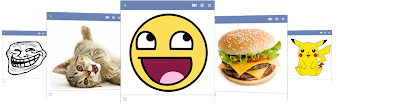
You can upload your images to be sent at the site smileyti.me. Next, the code will appear on the page Chatting up this site. And, if you want to send the picture, you can simply copy-paste the code on your Facebook page chat, and the image will appear.

Create Facebook smiley chat codes from any image and post them into your Facebook chat.

How to insert Image in Facebook Chat
Get started with 3 easy steps:

Step One > Open smileyti.me > Click the “Choose File” Button and choose an image from your computer

Step Two > Click the “Upload Now” button
upload image to Facebook Chat

Step Three > Paste the code to Facebook Chat
Example :
[[375037352572362]] [[375037339239030]] [[375037342572363]] [[375037345905696]] [[375037349239029]] [[375037472572350]] [[375037469239017]] [[375037479239016]] [[375037475905683]]
[[375037462572351]] [[375037569239007]] [[375037562572341]] [[375037565905674]] [[375037555905675]] [[375037559239008]] [[375037669238997]] [[375037665905664]] [[375037672572330]]
[[375037675905663]] [[375037682572329]] [[375037772572320]] [[375037775905653]] [[375037762572321]] [[375037765905654]] [[375037769238987]] [[375037955905635]] [[375037939238970]]
[[375037962572301]] [[375037929238971]] [[375037959238968]] [[375038099238954]] [[375038102572287]] [[375038105905620]] [[375038109238953]] [[375038112572286]] [[375038269238937]]
[[375038262572271]] [[375038272572270]] [[375038295905601]] [[375038292572268]] [[375038485905582]] [[375038479238916]] [[375038475905583]] [[375038472572250]] [[375038482572249]]
[[375038632572234]] [[375038639238900]] [[375038642572233]] [[375038635905567]] [[375038629238901]] [[375038765905554]] [[375038755905555]] [[375038762572221]] [[375038752572222]]
[[375038772572220]] [[375038902572207]] [[375038925905538]] [[375038899238874]] [[375038919238872]] [[375038922572205]] [[375039145905516]] [[375039155905515]] [[375039152572182]]
[[375039142572183]] [[375039149238849]] [[375039252572172]] [[375039232572174]] [[375039239238840]] [[375039249238839]] [[375039235905507]] [[375039412572156]] [[375039405905490]]
[[375039389238825]] [[375039399238824]] [[375039409238823]] [[375039552572142]] [[375039555905475]] [[375039545905476]] [[375039559238808]] [[375039549238809]] [[375039779238786]]

And the result is like this :
insert Image in Facebook Chat
that's it, so make a different chat with your facebook friends
Read more >>

How To Move iPhone Applications to Computer

8:50 AM

(0) Comments


How To Move iPhone Applications to Computer ~ Various applications are sold in the App Store continues to grow day after day. Is now available not less than 200,000 kinds of applications both free and paid.
One of the advantages of buying apps in the Apple App Store is the integration and compatibility of applications on a number of gadgets.

For example, we buy games or ebook applications through the iPhone, then we want to move to the iPod Touch, iPad or MacBook can be done easily.
That way, we do not need to buy two or three applications together to complete the collection of games or ebook into our Apple devices.
Move iPhone Applications to Computer

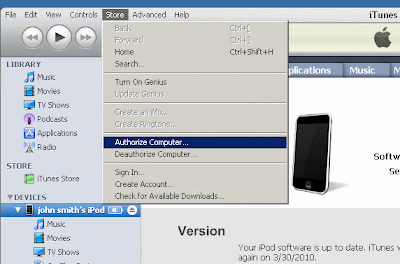
Easy to do so. But before moving all paid applications from the iPhone (or iPod Touch or iPad) to a computer or a laptop, be sure to authorize the computer before being connected to the device. To authorize, following step-scarce:


  •      Open iTunes
  •      From the menu "Store", choose "Authorize Computer"
  •      In the dialog box that appears, the default Apple ID button. If you have an AOL account, select  AOL.
  •      Enter your Apple ID or AOL ID following his or her password, then click the "Authorize"


After we connected the device to the computer and the icon that appears in iTunes, you can choose "Transfer Purchases" from the "Your device name" in the menu "File". All applications that we buy will be moved to a new Mac. Move iPhone Applications to Computer Good LuCk
Read more >>

Mysms : Application for the Messengers of All Types of Platforms

1:19 AM

(1) Comments

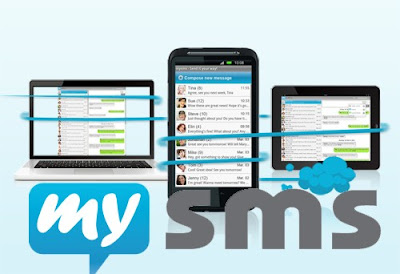
Mysms : Application for the Messengers of All Types of Platforms If many users may choose WhatsApp Android, and Apple has officially of their messaging platform called iMessage. But the application also has the same function, is sending a message through the Internet.
But, now there is a new application called mysms considered a iMessage version that can be used for all types of platforms.
mysms

You can send, receive or create a message on all types of electronic devices, from laptops, tablets, PCs and smartphones. Unfortunately, this application does not support BlackBerry or Windows Mobile Phone.

Platform which supports pretty much any application. Of the Android OS, IOS, Chrome, Windows, Mac OS X up to Facebook. And, interestingly, the application can be downloaded for free. If you want to try it, you can click This Link Mysms
Read more >>

How to Change Email Settings in Facebook

1:03 PM

(0) Comments

How to Change Email Settings in Facebook ~ Some time ago, the number one social networking world, Facebook has changed the email users using address@facebook.com. This they did without any notice.
so that measures, many facebooker who was troubled. Not only that, the new email delivery to mobile users rose up mess.
Change Email Settings in Facebook

However, it turns out you can also change the email addresses with ease

The following are the steps you have to do.
  • Access your Facebook timeline. 
  • Go to page About
  •  There, you will see Contact Info. There, you will see there an email with address@facebook.com. You can edit the address. 
  • On the Contact Info page, you will be able to see two email addresses. You can choose to hide or display the email address in the timeline. 
Unfortunately, you will not be able to delete the email from Facebook. However, you can change the name of the email as you wish. And, these changes can only be changed once. Change Email Settings in Facebook
Read more >>

how to access website with a QR code

6:12 AM

(0) Comments

What is a QR Code?


QR code stands for Quick Response Code. First developed by Japanese company Denso-Waves in 1994. Currently you can already see
QR codes in various media, banners, website, t-shirts, and other devices.

QR Code can store the link url, geographic coordinates, text and numbers. Compared to regular barcodes, QR has a large data storage space. For code numbers and letters, they were able to save to 4.296 characters. Comparing with conventional barcode that is only capable of storing 20 digits.

How to Access the QR code from a mobile phone?

To read QR codes, you need a QR reader. This application can be downloaded directly to mobile phones by typing in the browser address http://reader.kaywa.com phone and then follow the instructions in it.
QR code

You can also download a QR reader application through the computer in http://reader.kaywa.com/getit. Previously, you will be asked to register.

QR Code and Ithedoctor.com

Now, try running the application on your mobile QR reader. Point the camera to the existing QR code on the front cover or below.
QR code ithedoctor.com

If successful, your phone will slide into www.ithedoctor.com address and official opening web pages the IThedoctor site.. via Tabloidpulsa
Read more >>

BlackBerry Messenger on BlackBerry V6.1 Beta Zone

6:57 PM

(1) Comments

BlackBerry MessengerCurrently BlackBerry Messenger V6.1 you can download the BlackBerry ® Beta Zone in which there are several new features. Now you have a lot of ways to personalize the message with a few additional new features in V6.1 of this fuel. As the animated avatars, new emoticons, chat bubble color adjustment (colored chat bubbles), an increase in the number of characters a personal message and integrate it with pictures. The addition of new personalization features are due to numerous requests from communities for fuel and the testers from BlackBerry Beta Zone.

Avatar animations.
You can access a selection of animated GIF on the image to be installed as an avatar. Three animated avatars that are available, namely 'smiling', 'laugh' and 'love'.

Addition of characters in a personal message.
In the latest BlackBerry Messenger V6.1, space private message (status) was added to 160 characters. The previous limit of 80 characters.

Colored chat bubbles. 
Chat bubble color adjustment by selecting the 10 colors available.

Camera / Avatar Integration. 
Buddy can change / update the avatar fuel directly from your BlackBerry camera application by selecting "Set as Display Picture fuel" from the options menu.

New emoticons.
A picture has a meaning and different words. With the addition of 12 new emoticons in the catalog of fuel, my friend has a lot of ways to express yourself and personalize the message to several friends who have contacted the fuel.~ BlackBerry Messenger on BlackBerry V6.1 Beta Zone
Read more >>

How to Protect Computers from Virus Attacks

10:51 PM

(1) Comments

Protect Computers from Virus ~ Can not be denied to millions of people currently have to use a computer and must have internet access, now with the internet access is easy access from a virus into a computer system or us.
not only harmful to our system but sophisticated viruses that are specially made to harm our data, therefore, to avoid the dangers of viruses and spywere should we give or make a protection to ward off the danger of the virus in our computers so we can more freely access the Internet without are concerned that there is a virus
Virus
Kill computer virus and spywere
1. Start protection. Each computer is usually already have anti-virus program, like Windows is already integrated with the Microsoft Windows Security Center.

The program should be periodically updated your skills in order to maximize protection to protect your computer.

2. Choose anti-virus program as needed. Please use anti-virus free or paid. But some anti-virus features in paid more diverse, so the ability to protect your computer from viruses is higher than antii-free virus.

spywere
spywere
3. Program is not only dangerous virus, but also there is the so-called spyware. This type can be more dangerous than a virus because spyware can find out what computer users are doing at any time with the device. So the bias is said that the spyware was a spy in cyberspace.

4. Find out how the virus works. The main difference between spyware and viruses in the manner of their deployment. The virus can independently reproduce the cell to any data on the computer. While deployed as a spyware cookie that appears every time the computer user to access the internet.

5. The most effective way to ward off computer viruses are always adding information about the virus and anti-virus. Find out how to protect computers with anti-virus and identify the types of virus that can threaten the security of the computer. ~ How to Protect Computers from Virus Attacks
Read more >>

Read BBM Secretly From Sender

10:34 PM

(1) Comments

For users of BBM (Blackberry Messenger) are already familiar with Blackberry application this seed must already know, when he received a BBM message, the sender will receive notification in the form of a check with the letter D to indicate that the message to the recipient (Delivered). A letter will then be changed to R as you read the message (read).

At some point, of course there are conditions where you are so curious to read a message of fuel received, but not known by the sender, because they do not want further communication.

In fact, there are techniques to remain able to read the message without sending notification to the sender R. Here's how:
Before you can do this, there is a setting to do.

1. Run the Blackberry Messenger application.
 2. Click the button menu, choose Options.
 3. Scroll to the Save Chat History and change the option Never a Device or Media Card.

4. Click OK if you appear like this.
 5. Press the back button, click Save.
Now you should be able to read incoming messages without sending fuel R notification to the sender. But with the following techniques.

6. When there is an incoming message, open the fuel but not through the notification center under the bookmark hours.


7. Navigate highlight to the sender, but do not rush to open the message.
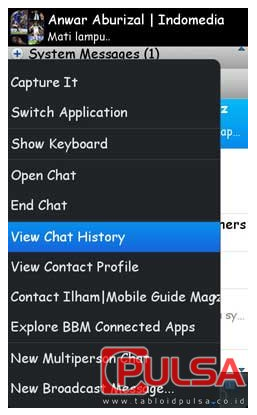
8. Click on the menu, select View Chat History
9. Open a last resort or by the date when the message is sent.
10. And you can freely read the message without the knowledge of the sender.
In addition to using manual techniques such as the above there are other ways, namely by using the help of an application called Peep It.

11. Applications Peep It can be obtained from the App World to buy it for $ 2.99, or try this application in the trial version for free
 
12. Settings in steps 1-5 should also be done while using the application Peep It.
13. When receiving a message that you want to fuel "voyeur", you simply open the application Peep It.

14. Select the desired contact from the list.
15. You can freely read the message without sending a notification received "R" to the sender with greater ease. (Anwar Aburizal)
via > tabloidpulsa.co.id
Read more >>

Activate Flip 3D by Mouse

2:43 AM

(0) Comments


Activate Flip 3D via Mouse
Windows operating system is now known as the reliability of the graphics display, and one of them is a 3D flip. Well, below is how to enable the 3D flip by moving the mouse at the end of the screen, but in fact the trick is not easy, because often we find the failure.
Well, in anticipation of failure, you can use the Vista Flip 3D activator. You can download the http://notj.net/flip3D/windows_vista_flip_3d_activator.html
you can just install the tool, and check by moving the cursor to the end of the screen.
You can just mark the desired mouse button. As long as you turn on the 3D flip. You can use the mouse scroll the window, and click to activate it.
This application is also able to display your favorite wallpaper.
Utility is quite light and small, with consumption of the system only 2mb. So you do not need to hesitate system resource will be exhausted
Read more >>

The way to create android programs

9:36 PM

(2) Comments


The way to create android programs
Should you be looking with regard to information on how to formulate Google android software, let us assist you to. You know, Google android apps are very loved by individuals with Google android systems.
Some individuals can't learn what these are searching for, in order that they desire to make their unique. Then you have some that want to build Android mobile phone apps to allow them to sell these phones earn money.
Regardless of what that are used for wanting to develop these kind of applications, we could aid!
With the Android os Application You need to CreateBefore getting began with the way to produce Android os programs, you simply must consider the app you wish to develop. Start with classification as well as take into consideration which in turn category the actual iphone app might fit in.
Next think about the Android iphone app you need to produce. For those who have not a clue to what to build up, start with with the distinct types additional Android os apps are placed throughout.
Below are a few types the Android mobile phone apps they fit within.Proper Planning Settles When you Want to Develop a good Android Software As with all venture you'll want to plan the whole undertaking prior to starting any kind of work with the particular venture.
Do not forget that "failing to organize can be likely to fail". And also faltering is something you dont want to accomplish when learning the best way to build Android apps.

A straightforward project strategy can help you save lots of time on your application.Achievement Duration of Venture Probably the most neglected facets of growth 's time invested in the venture. Simply because an app is straightforward does not mean it will require much less time than a large complicated application.
It is possible to a lot of elements that you'll want to consider when it comes to moment used on a project. One of the most neglected part of the course of action to build the Android mobile phone app may be the ready occasion for the software. Simply receiving every thing jointly including information for the software as well as testing treatments in place will require time to complete.

You can even need to read something totally new to acquire the required outcomes on your own application. In which learning normally takes some time. Then there is even the time that it is going to take any time screening the particular iphone app. Bear in mind a lot of smart phones have some eccentricities and you may should address these kind of for the best final results. Through an application that will merely preps 1 device is something that you wish to steer clear of at all costs.
Consequently, when preparing your project be sure you include constantly that you might not have regarded but is obviously crucial while studying how to produce Google android apps.Industry for Android os ApplicationFinding out how to develop Android mobile phone applications can provide all sorts of possibilities.

When you have perfected just what it takes to generate a good application and get visitors to down load the idea, it appears as though the night sky could be the restriction. However, there is something you need to contemplate while developing your application and that is learning if there is an industry on your app or not.

Establishing a good iphone app in which no person will probably obtain or even use is something that just about all programmers worry and it's really far better to decide the marketplace for your own app before starting creating that.

Seek out additional Android os software that are within the identical market and see just how popular they are about the Google android iphone app shop can provide you with a good suggestion in case your iphone app will likely be profitable you aren't.

Abilities Necessary When Creating an Android mobile phone App When you are doing Android mobile phone programming you ought to get an emulator that can be used to check your product out. When making these Droid applications you can also analyze in distinct units making sure that your own iphone app conditions virtually all of the gadgets. Needless to say there can be a number of units that will act somewhat humorous sometimes nevertheless be sure to target at the very least the superior ten smart phones for optimum results.
The way to create android programs


As well as your Google android app should function wonderfully around the finest Google android cell phone at that time. The true secret pertaining to working out develop Android mobile phone applications is testing. Ensuring every thing functions operate should on just about any gadget. Make sure you comprise of Google android pills as well as smart phones any time tests your products.
What Specialized niche or Precisely what Android Software Classification Will You Make use of?Allow me to share the commonest Android software categories. Anyone application will likely need to actually concentrate on one of these types for the best results. Naturally, drilling right down to a specific category will likely be essential however a broad area of interest can help you emphasis much better any time developing a good android app.

The following may be the Android iphone app groups: Books, Business, Communication, Education, Entertainment, Health & Physical fitness Media & Movie, Medical, News, Shopping, Sports, Tools, Travel.
WeatherSimply by obtaining a niche or group your Android mobile phone app is inserted to you are able to aid make sure that your Google android software will likely be discovered by customers which are searching for the actual Google android app keep.
Take for instance you're making a Metacafe Video Google android Application that makes it an easy task to comment on Metacafe video clips helping get the video clips you would like cached in the system; you will be much better prepared for listing the idea around the Android mobile phone app shop given it suits the entertainment group. By using these types of simple steps concerning how to produce Android mobile phone applications you will get your current software ready very quickly. Nevertheless, do not forget that prep is the key.
Read more >>

Enjoying Google Music service

2:22 AM

(1) Comments

Google Music is an online storage service where you can store up to 20,000 songs in Google's cloud servers. That way, you can upload your favorite songs at home, and listened to it in the office without having to sacrifice hard drive space. The main problem is the service itself is only limited to the United States alone, but with a few tricks, you can enjoy it.

Google Music serviceHere are the steps you need to do to be able to enjoy a Google Music service.

1. to use this service, you must sign in using your Google account on page Music.Google.com. But Google can identify your location outside the United States through the IP address being used. It will display a warning that this service is only available to U.S. only.

2. This service is a way to outsmart the help of TunnelBear applications. With this application, you can use the IP address of the location of the Americans through the VPN network. Google Music itself requires an IP address when the first Americans to register. After that you can use this service anywhere using free IP address.

TunnelBear3. Download an application at the address TunnelBear www.tunnelbear.com / install. Click download for PC or Mac, then install the application.

4. Do register early using the email address. After you do the email confirmation is received, then the application is ready for use.

5. After sign in choose the free option. Click next if it is. To use the application, click the play button until the status becomes ON. Wait until the status becomes connected. When you are running, then a graph showing the connection will appear.

Google Music service
6. Go back to Google Music Website  and do sign in again. Must have been accessible. After that download Music Manager Application is used to upload music files. Install the application and sign in using the same account when you sign up on Google Music. If you have reached this step, you can close the TunnelBear (This application is used only to sign in at the Google Music only)

7. Specify the default folder where the music files will be uploaded. To upload, select the music file and press the upload button, then click Go to Google Music to check whether it has been entered in the account or not.

9. To see the music files already on the Upload Songs click on the library. File will be displayed in the main window; here you can play the songs, adding to the play list. Or do edit the info...

In this way and hopefully useful Google Music Service can be enjoyed anywhere...
Read more >>

Download Torrent life of IDM via ziTorrent

11:02 PM

(1) Comments


torrent
Typically, to download Torrent files in use applications like Torrent client uTorrent, Vuze, Bit Comet, and so forth. Judging from the speed Download, Torrent file depends on the seeder and the Lecher. If the seeder more than the number of Leecher, then obviously the download speed will be more secure, if not necessarily vice versa.

We have available a wide range of web torrent client that is able to download the torrent file and store it in the server site. Later, the file can be downloaded by the downloader application such as Internet Download Manager (IDM) for example, because it was formed direct link. Torrent one web client that can be used is ziTorrent.

The steps that need to be done:
Zitorrent
1. www.zitorrent.com to enter the site, and then do the registration by pressing the option to sign up. In the registration process, you only need to enter username and email address. Click the Create my account.

2. Open your email address to receive a password, then you will be taken account my first page. Therein shown some information about the download. For a free account that is in use, you have a 30 GB quota and can only download 2 files simultaneously torrent. In addition, the maximum file size that can be downloaded torrent is 5Gb.

3. To start the download, click on My Downloads. Click the Browser button and select the file. Torrent that you store on your hard drive. Click the add a new torrent to start downloading.

4. can be seen at the bottom of the page contained the name of the file being downloaded. His status is downloading. you can see the download by clicking the name of an existing file.
Internet Downliad Manager
5. download process will run and the information can be viewed, such as the speed of transfer, then the number of seeder and peer (leecher).

6. If it is done, then his status will be completed. Click the name of the file to download using IDM. Worthy of note, the file that is ready for download only in the store 24 hours, after which it will be deleted from the server.

7. In addition to using the torrent file, you can also use the torrent file link separately to generate Direct Link, so no need to download first. Open a torrent file to be downloaded, then click the button on the page past a torrent link and paste the link in the box and click the add a new torrent.
Read more >>

Facebook Camera: Applications photo like Instagram

6:42 PM

(11) Comments

Facebook Camera
New news coming of a new facebook app to launch the photo was named Facebook Camera. In fact, this networking site recently annexed Instagram.

The deal between Facebook and Instagram itself is not one hundred percent complete. Reported previously, the delay of this deal due to the investigation of the U.S. Federal Trade Commission (FTC).

Here are some reviews of Facebook camera that was launched by Social networks like Facebook are reviewed in the previous inet.detik.com (Santi Dwi Jayanti - detikinet)

Front view

When entered into the application, users will see the camera icon in the upper left corner, coupled with photographs taken by the camera up Camera.

Then when discroll down to swipe, is shown photographs of the contact's Facebook users. Yes, this application connects to Facebook, so photos are uploaded on the website friend networking giant feeds were viewed in the photo.

Filter

When Instagram has a total of 17 filters in the services, then the application of Facebook has a 'cosmetic' a little more, namely a total of 14 filters.

Another difference with the filter's Instagram in terms of its name. Facebook Camera using the names of 'descriptive' rejuvenate the more users who will work especial photo. Contrast for example, Light, Bright and Golden.

Honestly, to filter on Facebook camera, he was less captivating than the filter are presented Instagram. The combination of colors in Instagram feels more 'bite'.
Facebook Camera
Features

Because the Facebook camera is connected to the app Facebook, then the user is able to do the tagging in the photo. Affixing like and comment also made possible though regrettable, this feature is 'stuck' in the above photo so sometimes feels damaging the display.

There was also the cropping features, but the tilt-shift feature that can make a particular point in the image sharp and blur other areas, absent in this application.

Although the filter less beautiful, but Facebook has a feature that superior camera, the ability to upload multiple photos at once (multiple upload) in a single status by making tick. Plus, the photos could be here later on-tap zoom. These two features are not found in Instagram.

So far, applications Facebook Camera is only available for IOS devices in the English-speaking countries.
Read more >>

Sugar Sync Online File Storage

12:37 AM

(2) Comments


Sugar Sync Online File StorageSugar Sync Online File StorageSugar Sync is a service that offers free online storage with a capacity of 5 GB. Just like Dropbox, Sugar Sync allows you to perform automatic backups of all your photos and videos taken with your phone camera.

With Sugar Sync Manager, you can also synchronize with a desktop application that can run on PC and Mac. Sugar Sync lets users select the folder that you want to synchronize. This is different from other applications that only perform synchronization on all files or folders in place within a specific folder in the My Document. So if you install a desktop application on more than one computer then when you login to the Sugar Sync website, you will see a list of computer and folder names are synchronized. As for the sync to all computers and devices, you simply drag and drop files to the Magic Briefcase folder in the My Documents.

Other features such as collaborator with Sugar Sync is more advanced because you can choose to allow your friend to just be able to read the contents of the shared folder or even go to edit the contents of the folder that you share.
Read more >>

Ubuntu One Storage File onLine

12:49 AM

(1) Comments

Ubuntu One Storage File onLine
 Ubuntu One in the beginning is an online storage service that is integrated with the OS ubuntu. This service was later extended its use to the Windows OS, Android and iPhone. Ubuntu One gives you a capacity of up to 5Gb of storage space for free. This service provides the most comprehensive feature among the services Google Drive, DropBox, Box, and Sugar Sync.

In contrast to all the applications mentioned above, the Ubuntu One allows users to automatically sync photos and videos to personalize folders you may be in the Upload.
Ubuntu One Storage File onLine
Ubuntu One also supports the bandwidth limitation of download and upload speed settings. Just like sugar Sync, you can also see the devices connected to the Ubuntu One account. However, unlike the Sugar Sync is not limited capabilities through access to the browser but also through desktop and mobile applications
Read more >>

Box Storage File On Android

12:18 AM

(1) Comments

Just like Dropbox, Box allows users to upload files to the server and access it from computer, website or phone android. Among the online storage applications contained in Google Play, Box is an application that provides the largest storage space that is about a 50GB.


This attractive offer for those who specialize in sign up or log in to your Box, through the android applications which provide for free on Google Play. Just like Dropbox, box also allows users to share files with friends and be a collaborator sent invitations to friends. With the application installed a desktop and mobile is on offer, you can now upload files with just one step so that your file can directly access from mobile phones and computers. too bad for desktop applications, you are required to pay.

Other feature of the Box is a comments field that allows your friends to comment on the files you share. You can also create shortcuts to folders and files so that you can phone home screen with practical access, including by looking at the update file contained therein. Unfortunately not equipped with a feature Box auto upload so you need to do a manual backup of your phone.
Read more >>